Tiger app Installation Guides
Tiger app is one of the movie streaming apps that are best for you to watch free movies. It's not on official Play store due to policy so you'll have to get Tiger APK file from website. Read the guide given below to see process of downloading Tiger on Android, Windows and macOS devices.
Download Android APKHow to Install Tiger app on Android
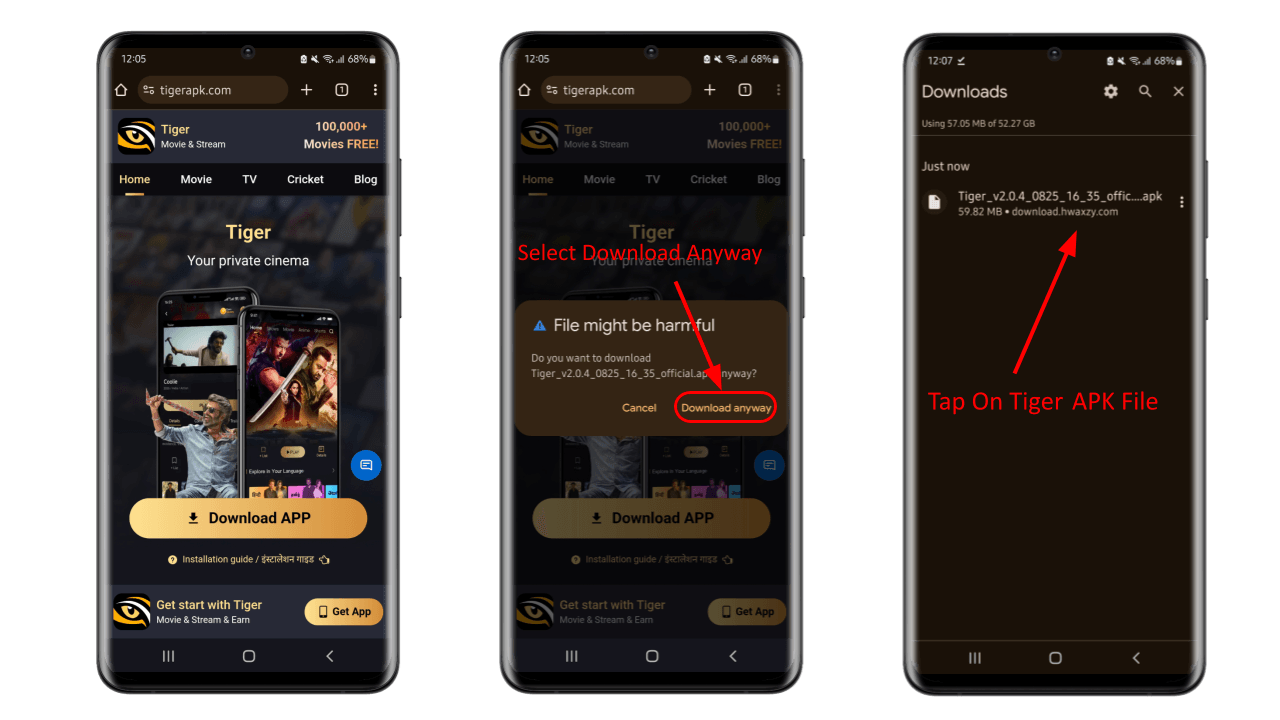
- Open your mobile web browser. If you have any ad blockers enabled on your device, disable them first to ensure the download completes without interruption.
- Download the original APK file from the official Tiger app website. Go to the download section and tap the button for the latest Tiger APK version.
- After you tap download, your browser may display a warning that says "This type of file can harm your device." This is a standard Android notice for all APK files downloaded outside the Play Store. Since you are downloading from the official site, you can safely tap "Download anyway" to continue.
- Wait for the download to finish completely. Depending on your internet speed, this may take anywhere from a few seconds to a couple of minutes.
- Once the download is complete, open your browser's download list or locate the Tiger APK file in your phone's file manager. Tap the file to begin installation.
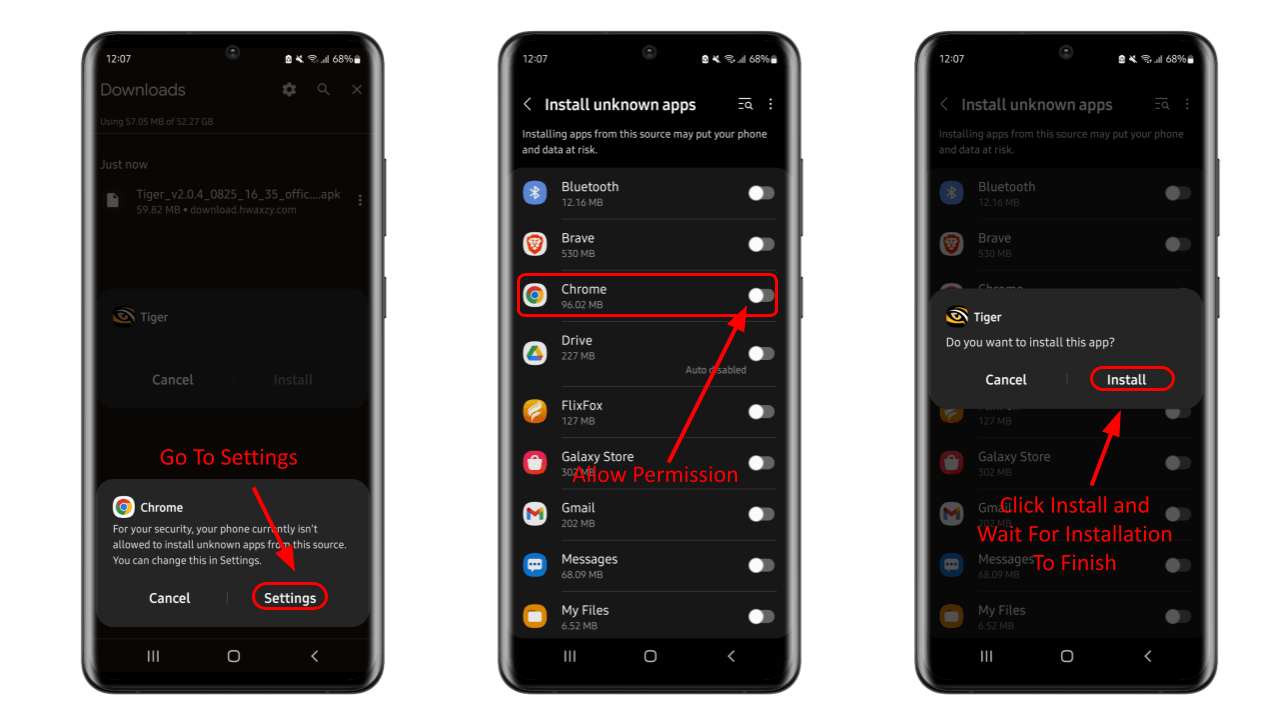
- If this is your first time installing an APK, Android will ask for permission to install apps from unknown sources. When the prompt appears, tap "Settings" and enable the permission for your browser or file manager. This allows installation of apps from outside the Play Store.
- If the installation window does not appear automatically, tap the Tiger APK file again and select "Install." Keep the screen open until the process finishes — closing it midway may cause installation errors.
Installing Tiger app on Windows
Tiger app doesn't support direct installation on Windows, but it can be downloaded using an Android emulator.
- Download android emulator like BlueStacks from official website to avoid security risks.
- Run installer and if you run into trouble, check their website for detailed installation guides or watch tutorial videos online.
- After installing the emulator, launch it and sign in with your Google account.
- Once the emulator is running download a browser and go to official Tiger app download page.
- Click download link for most recent Tiger APK version. The file will download directly just like on a regular mobile.
- After the Tiger APK download completes, click the file to start installing within emulator.
Installing Tiger app on macOS
You cannot install Tiger app in macOS directly, but it can be downloaded using an Android emulator.
- Download Android emulator for macOS from its official site and follow instructions given there.
- Install the emulator and open it to sign in using your Google account.
- Inside the emulator install web browser from Play Store and use this to download Tiger APK file.
- A confirm message will appear so select download and Tiger APK file will start downloading.
- After download completes click on APK file within the emulator to begin installation.
Installing Tiger app on Fire TV Stick
Direct installation on Fire TV Stick is not possible with Tiger APK, but it can be downloaded using an Android emulator.
- Go to your Fire TV home screen and open the Amazon Appstore. Type Downloader in the search box and download the app on your device. This tool lets you download APK files straight from your Fire TV Stick and save it without the use of a computer.
- After downloading the Downloader app, launch the app and locate the field to place the URL. Paste the official Tiger APK download link here. Be on the right site to download the real and not the fake and infected versions.
- Press the GO button and it will download the Tiger APK file directly to your Fire TV Stick. As the speed of downloading anything depends upon the connection you are using, so wait patiently till this process completes.
- And once it finishes downloading, there will be an option to install the app. Click on install and wait for it to finish. After completion of installation, you can delete the APK file to save some space on your device.
Update Tiger App
It is always recommended to update Tiger app in order to avoid an outdated version by adding new features and fixing security issues. Normally the app displays a notification when a new version of it is ready.
But if you don’t see the update popup for some reason or automatic update failed, you can manually update Tiger app. Just uninstall your current version and download Tiger APK from the Tiger app website.
Updates could feel time-taking and added effort but will give you improved features and latest content. Every update has bug fixes, stability improvements, and new categories of movies to watch.